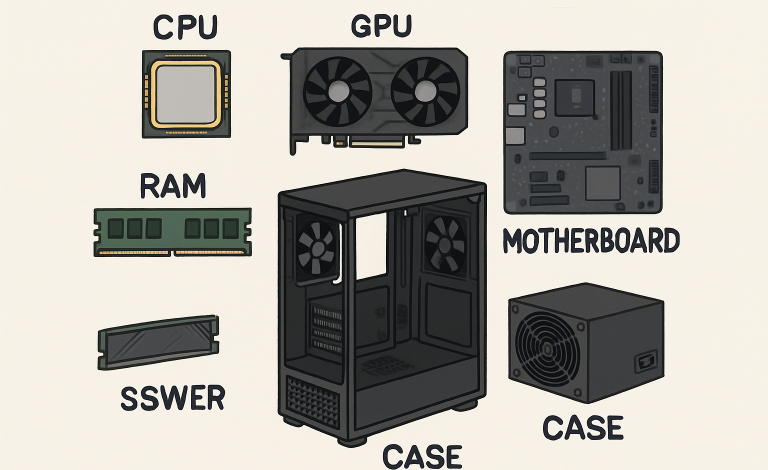
Embarking on the journey of building your own gaming PC allows for flexibility and personalization, letting you tailor every component to your unique playstyle and performance expectations. Whether you want to play the latest AAA titles at ultra settings or focus on esports with lightning-fast response times, careful planning lays the groundwork for success. Before diving into product lists and checkout carts, it’s wise to step back and make sure you’re setting yourself up for long-term satisfaction. For those looking for a more guided experience, consider using a custom PC builder to simplify some of the more complex choices.
Preparation goes beyond just selecting powerful parts—it’s about understanding your needs, setting boundaries for your budget, and ensuring every component works harmoniously together. Every build journey benefits from foresight, allowing you to avoid common pitfalls and maximize the return on your investment, both in terms of performance and enjoyment.
Define Your Gaming Needs
Not all gaming PCs are created equally—and they shouldn’t be. Before purchasing a single part, identify the genres and titles you intend to play most often. Cutting-edge shooters and immersive open-world adventures will demand more from your system than casual or retro games. Are you aiming for seamless 4K gaming, or is 1080p with high frame rates your goal? Researching recommended system requirements on trusted sites, such as PC Gamer, can help clarify the performance level you should aim for, serving as a reality check against your ambitions and available resources.
Budgeting Wisely
Setting a budget early in the process helps balance your desires with reality and avoids expensive surprises. Break out your spending into core components—such as CPU, GPU, and motherboard—as well as essential peripherals and accessories. Don’t forget to include room for a monitor, keyboard, mouse, and potentially paid software. Investing in reputable components minimizes both the likelihood of failure and the need for early upgrades. Remember, a future-proofed system often costs more upfront but saves on recurring expenses.
Choosing Compatible Components
Compatibility among parts is the linchpin of any stable PC build. Your chosen CPU and motherboard must share the same socket and chipset. Similarly, check that the system memory (RAM) matches your board’s supported type and maximum capacity. Graphics cards require not just the right interface but also enough space inside your chassis. Verified compatibility checks through resources such as Tom’s Hardware’s PC building guides can safeguard against show-stopping mistakes, especially for first-timers.
Planning for Cooling
Keeping your gaming PC at a safe operating temperature is critical for performance and hardware longevity. Choose between air cooling, which is more straightforward and more common, or explore liquid cooling for higher-powered systems that generate more heat. Regardless of your choice, prioritize a well-ventilated case and plan your airflow strategically to ensure optimal performance. Intake fans should bring in cool air, while exhaust fans expel hot air, creating a balanced ecosystem that prevents thermal throttling and component wear.
Understanding Power Requirements
Selecting the right power supply unit (PSU) is critical to ensuring stable and reliable system performance. Your PSU should be capable of delivering sufficient power to all components, even when the system is operating under maximum load. Using manufacturer wattage calculators helps accurately estimate your requirements, while choosing a unit with additional headroom allows for future hardware upgrades or safe overclocking. Selecting a PSU certified by standards such as 80 PLUS ensures higher energy efficiency, improved voltage stability, and reduced heat generation. This not only protects your components but also lowers electricity consumption and long-term operating costs.
Considering Future Upgrades
Gaming technology advances rapidly, making future-proofing a thoughtful consideration when building or upgrading a system. Choosing a motherboard with additional RAM and PCIe slots, along with more storage capacity than immediately required, allows for smooth upgrades as hardware demands increase. Features such as VR-ready connectivity and compatibility with the latest graphics standards ensure your system can support emerging gaming experiences. Thoughtful design elements, including efficient cable management, also simplify modifications and improve airflow. By planning, gamers can extend the lifespan of their rigs, reduce electronic waste, and gain greater long-term value from their investment.
Assembling with Care
Component installation requires a careful and methodical approach to ensure both safety and optimal performance. Working on a static-free surface and using an anti-static wrist strap whenever possible helps protect sensitive electronics from accidental discharge. Relying on step-by-step guides or official manufacturer documentation ensures each part is installed correctly and in the proper sequence. Take time to verify that all cables, connectors, and components are firmly seated, while avoiding excessive force that could cause damage. By proceeding slowly and paying close attention to detail, PC builders can minimize mistakes, safeguard their hardware investment, and transform the process into a rewarding and confidence-building learning experience.
Testing and Troubleshooting
The first power-on is a moment of truth: access your BIOS to verify that every component is recognized and performing as expected. Monitor temperatures closely during the first few hours of operation, and run stress tests to ensure stability under load. If you encounter setbacks, online forums and detailed troubleshooting resources from reputable sites, such as Tom’s Hardware, can provide additional solutions and guidance. Take note of serial numbers and warranty coverage in case future issues emerge.
Building your own gaming PC is a rewarding journey that blends hands-on technical skill with creative customization. It allows you to tailor performance, aesthetics, and functionality to match your exact gaming preferences and budget. By thoughtfully evaluating key factors such as component compatibility, performance needs, cooling solutions, and future upgrade paths in advance, you can avoid common pitfalls during assembly. Proper planning ensures a smoother build process, improved system stability, and long-term reliability. Ultimately, a well-prepared approach leads to years of immersive, high-performance gaming enjoyment on a rig that truly reflects your personal style.